
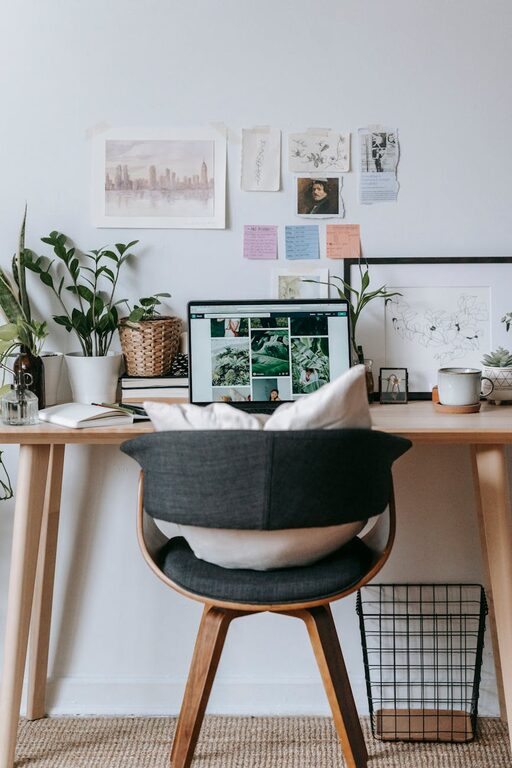
Working from home has become a common part of many people’s lives. Whether you freelance, work remotely, or need a dedicated space for occasional tasks, having a workspace that is both cozy and functional can significantly improve your focus and well-being. A well-designed home workspace helps you separate work life from personal life while creating a comfortable environment where productivity can thrive.
In this article, we’ll explore practical tips to help you create a home workspace that balances comfort with efficiency.
1. Choose the Right Location
Finding the ideal spot in your home is the first step. Here are some factors to consider:
– Natural Light: Aim for a space with plenty of natural light. Sunlight boosts mood and reduces eye strain.
– Noise Levels: Pick a quiet corner where distractions are minimal, especially if you attend frequent video calls.
– Space: Ensure you have enough room for essential furniture and to move comfortably.
– Ventilation: A well-ventilated area keeps the air fresh and your mind clear.
If you don’t have a dedicated room, a nook in a bedroom or living area can work well with the right setup.
2. Invest in Ergonomic Furniture
Comfort during long hours of work is essential. Consider these ergonomic furniture elements:
– Chair: Choose an adjustable chair with good lumbar support to maintain proper posture.
– Desk: Pick a desk that fits your space and work habits. Standing desks or desks with adjustable heights can add flexibility.
– Monitor Setup: Position your computer monitor at eye level to avoid neck strain.
– Keyboard and Mouse: Use ergonomically designed peripherals to reduce hand and wrist fatigue.
Ergonomic furniture helps prevent discomfort and health issues related to prolonged sitting.
3. Optimize Lighting
Proper lighting reduces eye strain and sets the right mood.
– Layered Lighting: Combine overhead lights with task lighting, such as a desk lamp.
– Adjustable Lamps: Use lamps with adjustable brightness and direction to suit different tasks.
– Avoid Glare: Position your screen and lighting to minimize glare on your monitor.
Soft, warm light can create a cozy atmosphere, while brighter light supports alertness.
4. Organize for Efficiency and Clarity
Clutter can distract and decrease productivity. Use these organization tips:
– Storage Solutions: Use shelves, drawers, or filing cabinets to keep supplies and documents tidy.
– Desk Accessories: Keep commonly used items within reach to avoid interrupting your workflow.
– Cable Management: Use clips or sleeves to keep cords neat and prevent tangling.
– Digital Organization: Develop a system for managing computer files and emails to avoid digital clutter.
An organized workspace helps keep your mind clear and focused.
5. Personalize Your Space
Adding personal touches makes your workspace inviting and uniquely yours.
– Decor: Choose artwork, plants, or photos that inspire you.
– Colors: Use colors that promote calmness or creativity, such as soft blues or greens.
– Comfort Items: Include cozy blankets, cushions, or a small rug to add warmth.
Personalization increases your connection to the space and can improve motivation.
6. Incorporate Greenery
Plants have many benefits in a workspace:
– They improve air quality.
– Add a touch of nature for a soothing effect.
– Reduce stress and enhance mood.
Choose low-maintenance plants like succulents, snake plants, or pothos if you are new to plant care.
7. Manage Noise and Distractions
Maintaining focus may require controlling noise levels and external distractions:
– Noise-Canceling Headphones: Useful in noisy environments for concentration.
– White Noise Machines: Can mask distracting sounds and improve focus.
– Clear Boundaries: If you live with others, establish “work hours” to minimize interruptions.
Creating a boundary between work and home life helps maintain a professional mindset.
8. Keep It Flexible and Adaptable
Your needs may change over time. Create a space that can adapt:
– Use modular furniture that can be rearranged.
– Add movable storage like rolling carts.
– Have a portable desk setup if you want to change locations occasionally.
Flexibility keeps your workspace fresh and responsive to your evolving work style.
Final Thoughts
Designing a cozy and functional home workspace is about balancing comfort, efficiency, and personal style. By carefully selecting the location, investing in ergonomic furniture, optimizing lighting, organizing effectively, and personalizing your space, you create an environment where you can thrive professionally and feel good while doing it.
Start with small changes, and adjust your setup as you learn what works best for you. A well-planned home workspace can make working from home both productive and enjoyable.